Have you ever been stuck in a traffic jam? Cars are lined up for miles, everyone is honking, and nothing is moving. It’s a complete standstill. Now, imagine a city with a perfect, high-speed network of superhighways, where vehicles can flow endlessly from any point to any other point without ever getting stuck.
That’s the difference between a messy, slow data system and one powered by Apache Kafka.
In today’s world, data isn’t just a list of customers in a database anymore. It’s a constant, rushing river of information. Every click on a website, every sensor reading from a factory machine, every credit card transaction, every social media post—it’s all part of this river. Traditional systems, like databases, are like trying to collect this river water in a single, giant bucket. It quickly overflows and becomes unmanageable.
Apache Kafka is the superhighway for this data river. It’s the engine that lets you build fast, scalable, and reliable data pipelines that can handle the modern world’s information chaos. Whether you’re a developer, a data engineer, or a tech leader, understanding Kafka is no longer a niche skill—it’s essential.
This guide will take you from “What is this?” to “I get it, and I know how to use it.” We’ll break down this powerful technology into simple, digestible pieces, using real-world examples you can relate to. Let’s build your very first data superhighway.
What is Apache Kafka, Really? (The Superhighway Analogy)
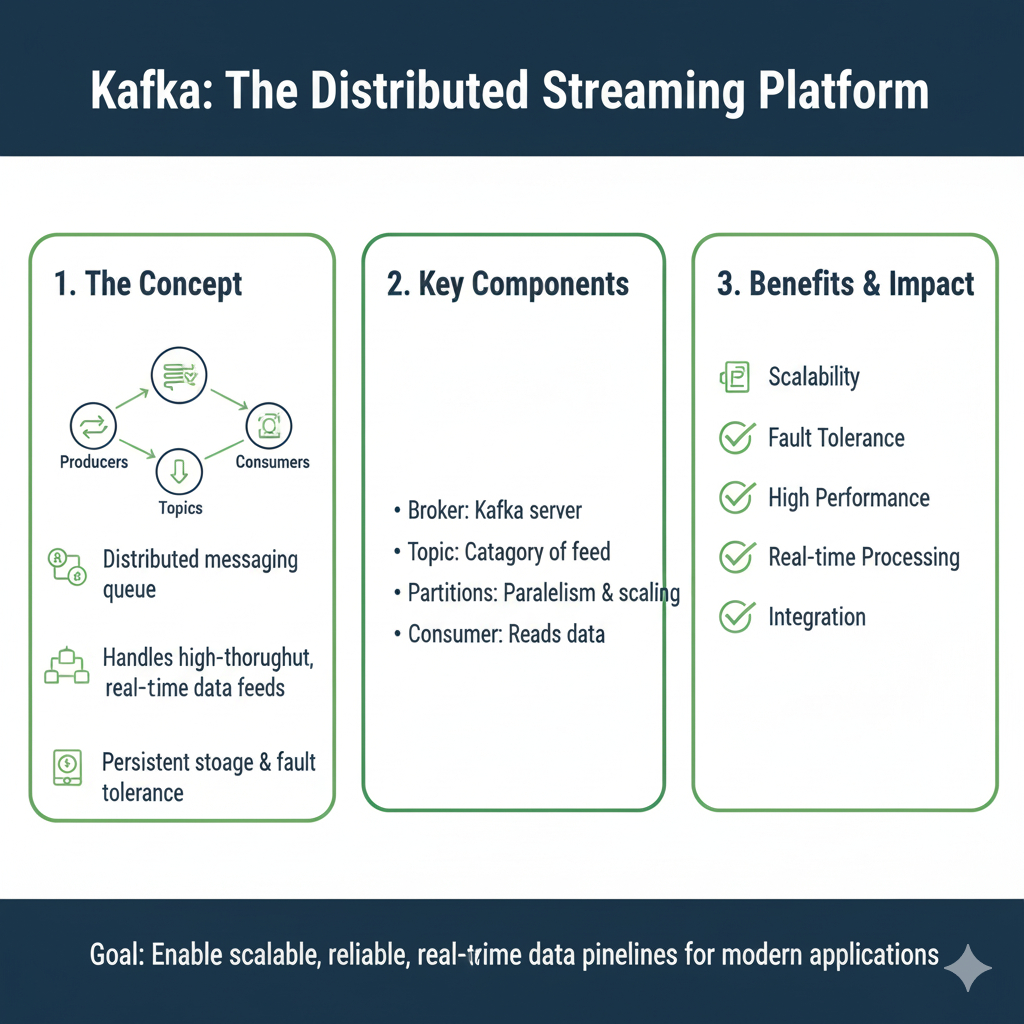
Let’s make this simple. Apache Kafka is an open-source, distributed streaming platform. That sounds complex, but the core idea is beautiful in its simplicity.
Think of Kafka as the central nervous system for a company’s data. It’s a system that lets different applications and services send and receive massive streams of data in real-time.
Let’s go back to our superhighway analogy:
- The Highway System: This is the Kafka cluster itself. It’s not a single road; it’s a whole network of roads (servers) working together to ensure traffic keeps moving, even if one road is under repair.
- The Vehicles (Data): These are the individual pieces of information, called messages. A message could be: “User #123 just clicked ‘Purchase’ on product #456.”
- The On-Ramps (Producers): These are the applications that create data. Your website, your mobile app, your IoT sensors—they are all “producers” that get data onto the Kafka highway.
- The Off-Ramps (Consumers): These are the applications that need the data. Your real-time analytics dashboard, your fraud detection system, your email notification service—they are all “consumers” that read data from the highway.
- The Highways (Topics): A Kafka highway is divided into different named roads, called topics. You might have a topic called
website-clicksand another calledpayment-transactions. Producers send messages to a specific topic, and consumers read from the topics they care about.
The magic is that the on-ramps and off-ramps are completely separate. The website (producer) doesn’t need to know which systems are listening. It just sends the click event to the website-clicks topic. Any number of consumers can independently read from that same topic without interfering with each other.
Why Do You Need Kafka? Solving Real-World Problems
You might be thinking, “Can’t I just connect my app directly to a database?” For many simple cases, yes. But when things get big and complex, that approach breaks down. Let’s look at the problems Kafka solves.
The “I Need to Talk to Everyone” Problem (Decoupling)

The Old Way (The Spaghetti Connection):
Imagine your company has a “User Signup” feature. When a user signs up, you need to:
- Save their info in the main user database.
- Send a welcome email.
- Create a record in the CRM system (like Salesforce).
- Add them to the email marketing list.
- Give them a starting bonus in the rewards system.
The old way was to have your signup application make calls to all five of these systems directly. This creates a tangled mess. If the email service is down, the whole signup process fails. If you need to add a sixth system (like a text message alert), you have to stop and rewrite your signup application.
The Kafka Way (The Superhighway):
With Kafka, the signup app simply publishes one message: “New user signed up: email=jane@example.com.” It sends this message to a topic called user-signups. It then forgets about it and moves on.
The five downstream systems (email, CRM, etc.) are all independently listening to the user-signups topic. They each read the message and do their job. If the email service is down for an hour, it’s okay! The messages will be waiting on the Kafka topic, and the email service will process them all when it comes back online. You’ve decoupled your systems, making them resilient and independent.
The “Data Firehose” Problem (Handling High Volume)
The Old Way (The Bucket Overflow):
Think of a Black Friday sale. Your website gets a million clicks per minute. Your database simply cannot write a million new records every minute. It will slow to a crawl and crash, causing you to lose sales and anger customers.
The Kafka Way (The High-Speed Buffer):
Kafka is built for this. It acts as a massive, high-speed buffer. It can easily absorb that flood of click events. The website producers write the events to a Kafka topic as fast as they can. Then, at its own pace, your database consumer can read batches of these events and write them to the database without being overwhelmed. Kafka protects your backend systems from traffic spikes.
The “I Need it NOW” Problem (Real-Time Processing)
The Old Way (The Overnight Report):
In many companies, data from the day’s transactions is extracted at night, loaded into a data warehouse, and analyzed the next morning. This means you’re always looking at yesterday’s news.
The Kafka Way (The Live Feed):
With Kafka, data is available the instant it’s produced. A fraud detection system can analyze a payment transaction as it happens and flag it for review in milliseconds, before the transaction is even complete. A live leaderboard in a mobile game can update instantly as players from around the world score points. Kafka enables true real-time applications.
Core Concepts of Kafka: Your Building Blocks
To master Kafka, you need to be comfortable with a few key ideas. Don’t worry, they’re straightforward.
H3: Topics, Partitions, and Brokers
- Topic: A categorized stream of messages. As we discussed, it’s like a named highway (e.g.,
sensor-data). Producers write to topics; consumers read from topics. - Partition: This is the secret to Kafka’s speed and scalability. A topic is split into one or more “partitions.” Think of a partition as a single lane on our superhighway.
- If a topic has 3 partitions, it’s like a 3-lane highway. This allows you to spread the data (and the work of processing it) across multiple machines.
- Messages within a partition are stored in the order they are received. This guaranteed order is crucial for many applications.
- Each message in a partition gets a unique, sequential ID called an offset. It’s like a line number.
- Broker: A single Kafka server. A Kafka “cluster” is made up of multiple brokers (servers) working together. Each broker holds some of the partitions. This is what makes Kafka distributed and fault-tolerant—if one broker dies, the others can take over.
H3: Producers and Consumers
- Producers: Applications that publish (write) messages to a topic. They decide which partition to send a message to (often just in a round-robin fashion for load balancing, or based on a message key to ensure order for related messages).
- Consumers: Applications that subscribe to (read) messages from a topic. They read messages in the order they were stored in each partition.
H3: Consumer Groups: The Key to Scalable Consumption
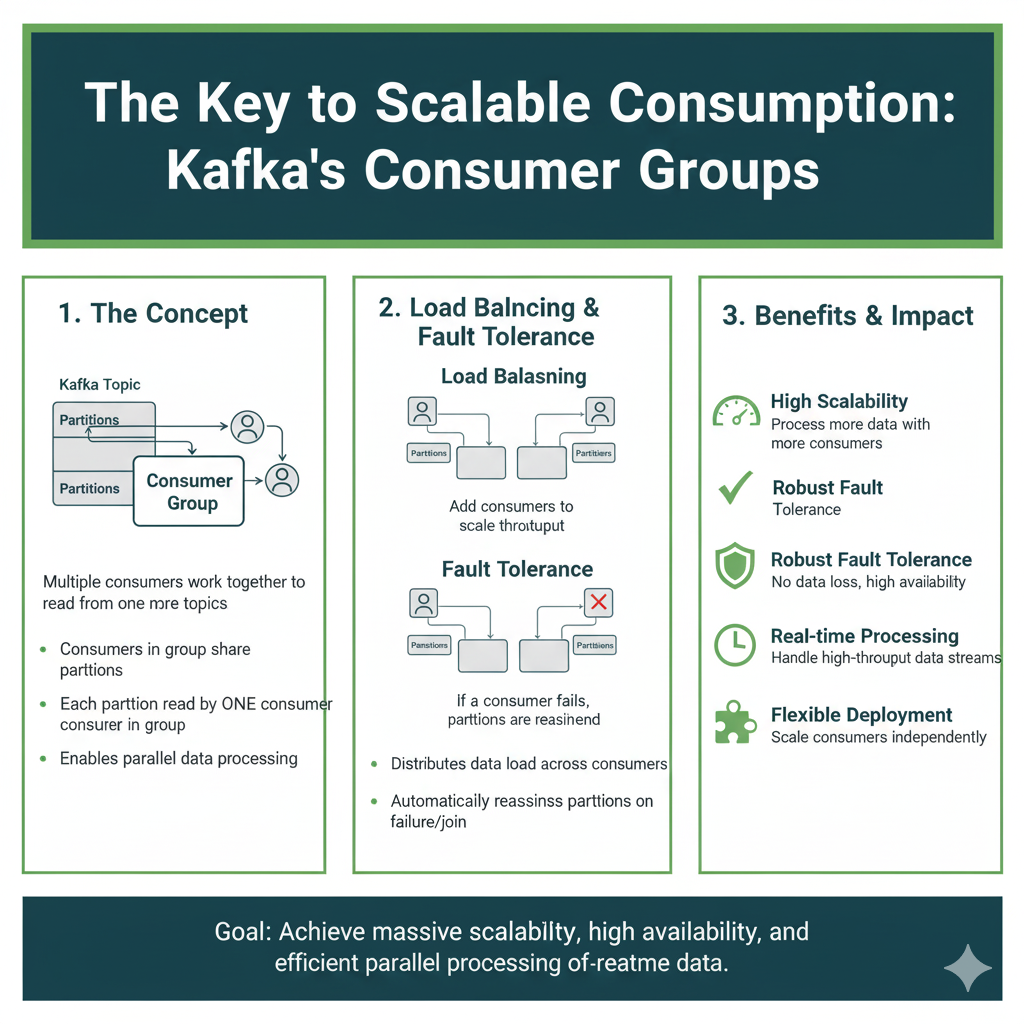
This is a powerful concept. A Consumer Group is a set of consumers that work together to consume a topic.
Let’s go back to the website-clicks topic, which has 3 partitions.
- Scenario 1: One Consumer. A single consumer application (part of the “analytics-group”) will read from all 3 partitions of the topic. It has to do all the work itself.
- Scenario 2: Three Consumers. If you start three instances of the same consumer application (all in the “analytics-group”), Kafka will automatically assign one partition to each consumer. Now the work is parallelized, and you can process data three times faster!
- Scenario 3: Four Consumers. If you start a fourth consumer in the same group, it will sit idle. Why? Because there are only three partitions. This shows how you scale your processing power by adding consumers, but you are limited by the number of partitions in the topic.
This model is why Kafka is so scalable. You can easily add more consumers to handle more load.
A Simple Tutorial: Building Your First Kafka Data Pipeline
Let’s get our hands dirty. We’ll set up a minimal Kafka environment and create a simple pipeline that sends and receives messages.
Step 1: Download and Start Kafka
- Download: Go to the Apache Kafka website and download the latest binary. It’s just a
.tgzfile. - Extract: Unzip it to a folder on your computer.
- Start the Environment: Kafka needs a ZooKeeper instance to manage the cluster. Don’t worry about what that is for now; just know it’s a required coordinator. Open two terminal windows.
- Terminal 1 (Start ZooKeeper):bash# Navigate to your Kafka folder cd /path/to/your/kafka-folder # Start ZooKeeper bin/zookeeper-server-start.sh config/zookeeper.properties
- Terminal 2 (Start Kafka Broker):bash# In the same Kafka folder, start the Kafka broker bin/kafka-server-start.sh config/server.properties
Step 2: Create a Topic
Open a third terminal window.
bash
# Create a topic named 'test-topic' with 1 partition
bin/kafka-topics.sh --create --topic test-topic --bootstrap-server localhost:9092 --partitions 1 --replication-factor 1
You’ve just built your first, single-lane highway!
Step 3: Start a Consumer (Listen for Messages)
In the same terminal, let’s start a consumer that will listen for any messages sent to test-topic.
bash
bin/kafka-console-consumer.sh --topic test-topic --from-beginning --bootstrap-server localhost:9092
This command will sit and wait, listening for messages.
Step 4: Start a Producer (Send Messages)
Open a fourth terminal window. We’ll use the built-in command-line producer.
bash
bin/kafka-console-producer.sh --topic test-topic --bootstrap-server localhost:9092
A > prompt will appear.
Step 5: See the Magic!
- In your producer terminal (the fourth one), type a message and hit Enter.text> Hello, Kafka!
- Immediately switch to your consumer terminal (the third one). You will see the message
Hello, Kafka!appear.
You did it! You’ve created a basic data pipeline. The producer sent a message to the Kafka topic, and the consumer received it. You can type more messages in the producer, and they will instantly appear in the consumer. This is the fundamental pattern that powers the world’s most complex data systems.
Real-World Use Cases: Kafka in Action
Let’s solidify your understanding with some concrete examples.
1. Real-Time Recommendation Engine (Netflix, Amazon)
- Topic:
user-viewing-events - Producers: The Netflix/Amazon video player apps.
- Consumers: A real-time analytics engine.
- The Flow: Every time you pause, play, or stop watching a show, the app sends an event to Kafka. The analytics engine consumes these events and instantly updates a “users who watched this also watched…” model. The recommendations on your screen update in near real-time.
2. Unified Logging System
- Topic:
application-logs - Producers: Every single application and microservice in your company.
- Consumers: A system that archives logs to cloud storage (like S3), a system that indexes logs for searching (like Elasticsearch), and a system that monitors logs for errors (like PagerDuty).
- The Flow: Instead of each application managing its own logs, they all send log messages to. Multiple teams can then use the same log data for different purposes without affecting the applications.
3. Internet of Things (IoT) Data Hub
- Topic:
sensor-data - Producers: Thousands of sensors in fields, factories, or vehicles.
- Consumers: A dashboard for live monitoring, a system that triggers alarms if a value goes out of range, and a data lake for long-term analysis.
- The Flow: Sensors constantly stream temperature, pressure, and location data to Kafka. The platform can handle the massive, constant data flow and route it to all the systems that need it simultaneously.
Best Practices for Building Robust Pipelines
As you start building with Kafka, keep these tips in mind.
- Choose Your Partition Key Wisely: If you need all messages for a specific user to be processed in order, use the user ID as the partition key. This ensures all messages for that user go to the same partition and maintain their order.
- Start with More Partitions: It’s easier to have a topic with too many partitions and not use them all than to try to add more later, which can be disruptive. A good starting point might be 6-12 partitions for a topic you expect to be busy.
- Plan for Schema Evolution: Use a schema registry (like the one from Confluent, the company founded by Kafka’s creators) to manage the structure of your messages. This prevents a new version of a producer from breaking all your existing consumers.
- Monitor Everything: Keep an eye on key metrics like consumer lag (how far behind the consumers are from the producers). A growing lag is a sign that your consumers can’t keep up and you need to scale them out.
Frequently Asked Questions (FAQs)
Q1: Is Kafka a message queue like RabbitMQ?
It’s similar, but different. Traditional message queues are great for task distribution (sending a “task” to be processed by one worker). Kafka is a log-based streaming platform designed for durability, massive throughput, and broadcasting streams of data to many consumers. It’s better for data pipelines and event-driven architectures.
Q2: Is Kafka hard to set up and manage?
Running a large, production Kafka cluster requires expertise. However, for getting started and development, it’s quite simple, as our tutorial showed. For production, many companies use managed Kafka services from cloud providers (like Amazon MSK, Confluent Cloud) that handle the complexity for you.
Q3: What happens if a consumer is slow or fails?
This is where Kafka shines. Because messages are stored durably on disk (for a configurable amount of time), a consumer can fail and come back hours or days later and pick up right where it left off, using the offset it last committed. The messages are not lost.
Q4: When should I NOT use Kafka?
Kafka is overkill for simple, low-volume, request-response type communication. Don’t use it if you need very low-latency (microsecond) responses for individual messages, or if your data doesn’t need to be persisted or replayed.
Conclusion: Your Journey to Data Mastery Begins
You’ve just built the foundation for understanding one of the most important technologies in modern software. Apache Kafka is the backbone that powers real-time experiences for billions of people every day, from their Netflix recommendations to their Uber ride.
You now know that Kafka is more than a tool; it’s a new way of thinking about data. It’s about building systems that are decoupled, resilient, and scalable. You’ve moved from seeing data as a static asset to understanding it as a continuous, flowing stream.
The simple producer and consumer you ran in the tutorial is the “Hello, World!” of a much bigger world. The principles are the same whether you’re handling a hundred messages a day or a trillion.
So, what’s next? Keep experimenting. Create a topic with multiple partitions. Write a small Python script using the confluent-kafka library to be a producer. The best way to master Kafka is to keep building. You now have the knowledge to start constructing the data superhighways that will power the next generation of amazing applications. Go build something great